
[LS-FINDITNM-15-1Y] ราคา ขาย จำหน่าย Cisco 15-device license for Cisco FindIT Network Manager - 1 year

ราคายังไม่รวม ภาษีมูลค่าเพิ่ม 7%
฿9,700
฿9,700
ฝ่ายขาย ADD LINE : @itk.co.th


 064-589-9386 คุณอุ๊ ฝ่ายขาย
064-589-9387 คุณนิด ฝ่ายขาย
096-713-3925 คุณหยุ่น ฝ่ายขาย 093-947-3375 คุณนัท ฝ่ายขาย Solution
097-285-3475 คุณเกียรติ ฝ่ายขาย
Highlights
● Purpose-built management for Cisco 100 to 500 Series networks.
● Discover, monitor, and configure the network from a single interface.
● Provides remote access to sites without VPNs or special firewall configuration.
● Simple to deploy and easy to operate.
Product Overview
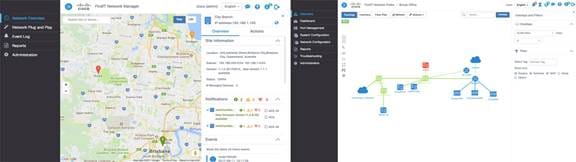
Cisco® FindIT Network Manager is a network management tool for deploying and maintaining Cisco 100 to 500 Series switches, routers, and wireless access points. FindIT Network Manager allows you to quickly discover the topology of a new network, generate a detailed inventory of the installed equipment, make changes where necessary, set up monitoring of the network, and be alerted automatically about critical events. With features such as automatic firmware updates and reporting on lifecycle and maintenance information, FindIT Network Manager helps ensure that your network remains up to date and fully supported.
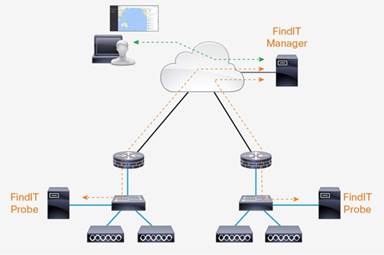
FindIT Network Manager comprises two components – the Probe application, which is installed at each site and discovers and directly manages the network devices at that site; and the Manager, which provides a summary view and alerts for each site in the network.
Figure 1 and Figure 2 show different views of the application at work, while Figure 3 shows a typical deployment of FindIT Network Manager.

Features
● Automatically discovers the network devices and provides a topology diagram and inventory report. Click to access detailed information about the devices.
● A customizable monitoring dashboard allows you to easily see the state of the network and how it is performing. Be alerted automatically to important events such as network devices going offline.
● Provides a single interface to configure system information, wireless networks, virtual LANs, and Ethernet switching.
● Offers automatic notification of firmware updates. Click to download and apply updates to devices.
● Detailed reports show lifecycle information about network devices - including maintenance and warranty status and end-of-life bulletins - and performance reports for wireless networks.
● Offers troubleshooting tools, including remote access to sites and devices, and the Network Show Tech – an archive of diagnostic information for the network that can easily be shared with technical support staff.
● Integrates with popular Remote Monitoring and Management (RMM) tools.